CSV Import for ProudNumbers
Include financial data from other accounting systems
ProudNumbers is designed primarily for Sage 50 users, but not every company within an organisation or group necessarily uses the same accounting system.
CSV Import allows financial data from other accounting systems to be brought into ProudNumbers, making it possible to include those companies within your management reporting and consolidation without the need for a complex integration.
Why use CSV Import?
CSV Import is particularly useful where a group primarily uses Sage 50 but one or more companies use a different accounting system.
It can also be useful for dormant companies or other entities where a direct Sage 50 import is not required.
Once imported, the data can be used in ProudNumbers for management reporting and, where required, consolidated with your Sage 50 companies.
Import the financial information ProudNumbers needs
When setting up a company through CSV Import, ProudNumbers imports the information required to create the company and its financial records, including:
- Chart of Accounts — including the reporting structure and categories.
- Nominal Ledger — nominal account names and codes.
- Transactions – the detailed financial transactions.
The CSV Import Wizard guides you through the setup and highlights errors that need to be corrected.
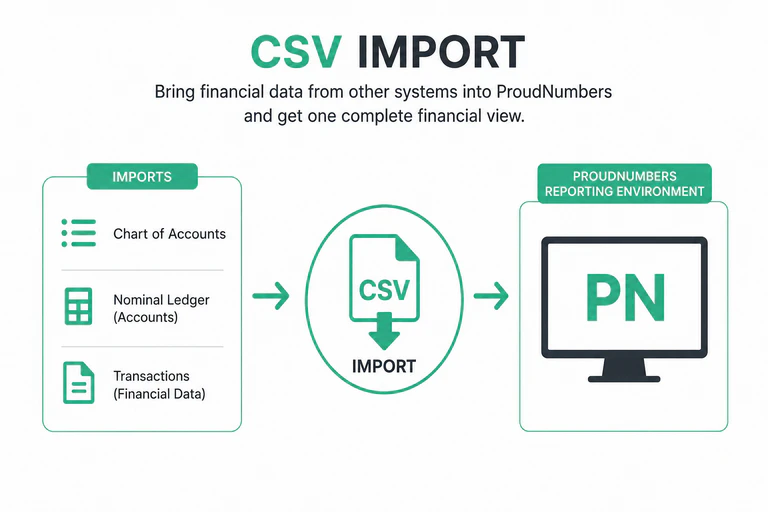
CSV Import
- No Complex Integration Required
- Sage 50 + Other Systems
- Multi-Company CSV Import
- Flexible Data Source
- One Reporting Environment
- One Complete Financial View
Designed for mixed accounting-system consolidation
CSV Import becomes particularly valuable when consolidating a group of companies that do not all use Sage 50.
Companies using Sage 50 can be imported in the normal way, while financial data from companies using other accounting systems can be brought into ProudNumbers using CSV files.
The companies can then be included within the same ProudNumbers consolidation, allowing group reporting without requiring every company to use the same accounting software.
Straightforward ongoing imports
CSV Import is not limited to the initial company setup.
Once a company has been configured, the Multi-Client Import Wizard simplifies subsequent data imports and can import data for one or multiple companies in a single session.
This makes CSV Import practical for companies that need to provide updated financial information to ProudNumbers regularly.
An additional option when you need it
For most ProudNumbers users, Sage 50 remains the primary source of financial data.
CSV Import provides additional flexibility when your reporting or consolidation needs to include a company whose financial information comes from elsewhere.
It means a different accounting system does not have to prevent that company from being included in your ProudNumbers management reporting.
See how professional management accounts can be produced in less than five minutes.