Company Consolidation for Sage 50 Users
Consolidated Management Accounts in less than five minutes
ProudNumbers Consolidation makes multi-company reporting as straightforward as reporting for an individual company. Once your consolidation is set up, professional consolidated Management Accounts can be produced in less than five minutes, using the same familiar reporting process as individual company reporting.
ProudNumbers Consolidation includes all the Management Accounts functionality of ProudNumbers, with additional capabilities for consolidating multiple Sage 50 companies, including inter-company transaction elimination and currency conversion.
Simple consolidation setup
Creating a consolidated company is straightforward.
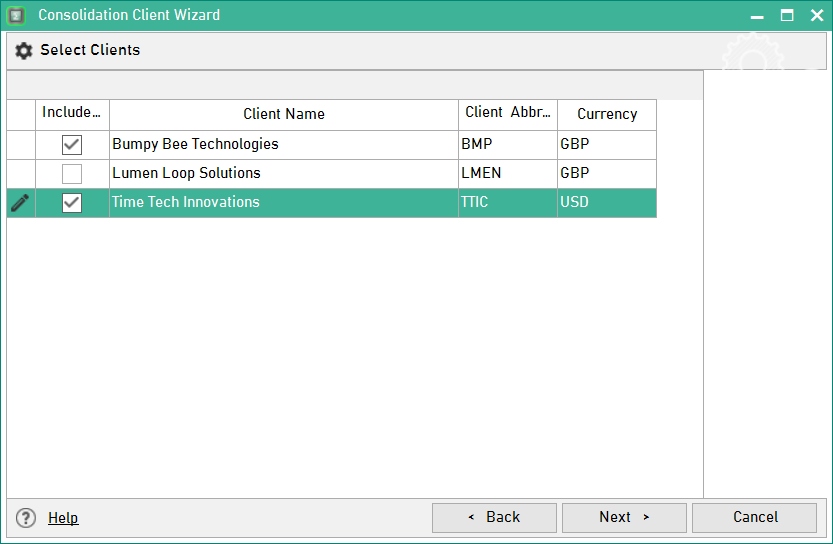
Select the Sage 50 companies you want to consolidate, then choose the Chart of Accounts from one of those companies as the starting point for your consolidated reporting structure.
The Chart of Accounts can then be easily adapted using simple drag-and-drop to accommodate differences between the companies being consolidated. Once created, this becomes the reporting structure for that consolidation.
After the initial setup, producing consolidated reports follows the same familiar process as reporting for an individual company.
If you need to compare your charts across multiple companies, download our free Chart of Accounts Comparison Tool.
- Management Accounts in Under 5 Minutes
- Simple Consolidated Chart of Accounts Setup
- Multi-Currency Consolidation
- Intercompany Adjustments
- Flexible Consolidation Structures
- Drillable Consolidated Reports
Consistent reporting across individual and consolidated companies
ProudNumbers maintains the same reporting structure and familiar presentation whether you are working with an individual company or a consolidated group.
Consolidated reporting includes:
- Management Accounts
- Debtors
- Creditors
- KPI Reporting
Reports retain the flexibility available within individual company reporting, including different reporting periods, multi-year analysis and drill-down to investigate the figures behind the consolidated results.
This consistency means that moving between individual company and consolidated reporting does not require a different reporting process.
Multi-currency consolidation
ProudNumbers allows exchange rates for different currency combinations to be entered in a simple process.
Companies included in a consolidation can then be converted using the relevant exchange rates, allowing the consolidated company to report in the currency of any company within the group or in a completely different reporting currency.
Intercompany adjustments
Adjusting Journals can be used to account for intercompany transactions and make the adjustments required for consolidated Management Accounts.
The adjustments are made within ProudNumbers without changing the underlying Sage 50 accounting data.
Flexible consolidation structures
A company is not restricted to belonging to a single consolidation.
You can create multiple consolidated groups containing some or all of the same companies, allowing different group structures and reporting currencies to be used independently.
This provides flexibility for international organisations and other businesses that need to view the same companies within different reporting structures, management groupings or currencies.
Analyse consolidated figures in detail
Consolidated reporting retains ProudNumbers' drill-down functionality.
Move from consolidated figures to the underlying financial information to investigate results and understand what is contributing to the group position.
Flexible reporting periods also allow consolidated reports to be produced for the period relevant to your organisation rather than being restricted to a single standard reporting period.
Preparing for consolidation?
Before setting up your consolidation, you can use Hexner's free Chart of Accounts Comparison Tool to compare Charts of Accounts side by side.
The tool identifies missing nominal codes, codes categorised differently, missing categories, differences in Chart names and differing nominal-code descriptions.
Download Compare Charts of Accounts for free.
`ProudNumbers Consolidation
ProudNumbers Consolidation combines the reporting capabilities of ProudNumbers Management Accounts with flexible multi-company consolidation.
From individual company reporting to consolidated Management Accounts, the reporting experience remains fast, familiar and consistent.
See how professional management accounts can be produced in less than five minutes.